In this field note
First establish where the zero appears
Open the status page for the affected machine. Record its exact model, uptime, local hashrate and the time you saw the fault. A pool showing an offline worker while the miner still hashes is a different case. Start that investigation with the pool and miner comparison.
On the device, save the relevant log lines and the board status before changing anything. If the screen shows a nonzero total with one board missing, use BITMAIN’s low-hashrate guidance. That distinction saves time when you describe the fault to service.
Follow the observation you can actually verify
| Observation on the S19 | What to capture | Next check |
|---|---|---|
| Pool connection fails | Configured endpoint, worker name and connection message | Compare the endpoint with the pool’s current setup instructions |
| Temperature alert or abnormal fan reading | Sensor label, reading and fan status at the same time | Check the exact model’s limits and whether external airflow is obstructed |
| Boards stay inactive with power or board errors | Board count, error text and time since startup | Provide the log and model details to the manufacturer or service contact |
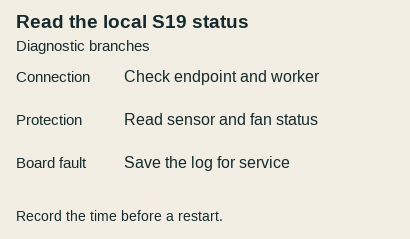
BITMAIN lists network trouble, thermal protection, fan failure and power or board faults in its zero-hashrate guide. These symptoms can overlap. A working login page establishes that you reached the controller. It says little about whether a hashboard is receiving power or the miner can reach its pool.
Read the sensor label before comparing temperatures
Intake air and board temperatures are different measurements. BITMAIN’s temperature table distinguishes models and measurement points. Copy the full label into the service note. A bare number like “75 degrees” leaves the next person guessing which sensor you read.
After correcting a verified connection setting, look for the local rate to return and for new shares under the intended worker. If protection recurs, preserve the latest warning and seek service. Leave protective shutdowns in place. The mining hardware guide explains the difference between a device’s advertised capacity and the work it delivers.
Frequently asked questions
Does zero on the pool prove my S19 has stopped?
No. Compare the miner’s local rate with the pool’s worker and time window. This checklist starts when the device itself reports zero.
Should I use another S19 model’s temperature limit?
Check the exact model and whether the value is intake, PCB or chip temperature. Those readings refer to different locations.
What should I save before restarting the miner?
Save the current status page, board count, fan and temperature labels, uptime and the relevant log lines. Include the exact model and the time of the fault.
Put it to work
Mining calculatorSources are listed above. This guide explains the mechanics; it is educational information, not a recommendation to invest or buy mining equipment.